
As you are working in PracticeMaster v17, whether in Client files, Contacts, Journal entries or Calendaring, have you discovered “Quick Clicks?” The Quick Clicks pane, located to the right of the pane, is available in all PracticeMaster data files and the Matter Manager, although its functionality differs from file to file.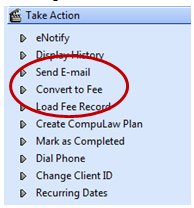
The PracticeMaster Quick Clicks pane provides an easy way to navigate and organize data files in PracticeMaster. The Quick Clicks pane of each file provides single-click access to a variety of actions and options that will help you complete tasks faster, more efficiently. For example, in a calendar record, creating a fee entry from that calendar record is fast and simple.
Other tasks easily accomplished using Quick Clicks:
- Running Workflows
- Find and Replace
- Document assembly
- Creating calendar plans and CompuLaw plans
- Searching Worldox documents
- Filtering contacts or clients
- Sending eNotes
- Running Reports
- Customizing the column layout
- Renaming a Contact
- Exporting Email journal entries to Outlook
New for Version 17 is QuickViews, which are created and maintained as part of Quick Clicks.
QuickViews save a column layout, filter, and index to provide individual views of your data that is easy to switch between. This is a powerful way of organizing and finding information in PracticeMaster Client files and Contact files.

Taking the time to explore the capabilities provided by Quick Clicks can save you time and help you find the information you need quickly.